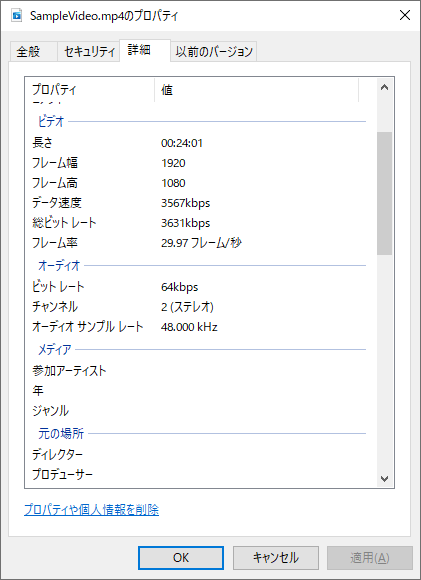
Windowsのシェルオブジェクトを使用して、動画ファイルの情報を取得します。
サンプルプログラムでは、フォルダを指定して、そのフォルダの中にある動画ファイルを検索して情報を取得します。結果を指定したシートに追加していきます。

【サンプルプログラム】
Type VideoData
    width As Long                   ' 幅
    height As Long                  ' 高さ
    TotalBitrate As Long            ' 総ビットレート
    FrameRate As Long               ' フレーム率
    Duration As LongLong            ' 長さ
    EncodingBitrate As Long         ' データ速度

    AudioChannelCount As Long       ' チャンネル
    AudioEncodingBitrate As Long    ' ビットレート
    AudioSampleRate As Long         ' オーディオサンプルレート
End Type


' フォルダにある動画ファイルからサイズを取得する
Sub GetSizeOfVideoFileInFolder(ByVal path As String)

    Dim fso As FileSystemObject
    Set fso = New FileSystemObject

    ' ファイルを検索
    FindVideoFileList fso, path, Sheets("Sheet2"), "A1"

End Sub


' フォルダを検索
Sub FindVideoFileList(fso As FileSystemObject, parent_path As Variant, ws As Worksheet, start_pos As String)
    Dim path As Variant
    Dim width As Long
    Dim height As Long
    Dim result  As VideoData
    Dim last_rgn As Range
    Dim dwwk As Double

    Dim wk1 As LongLong
    Dim wk2 As LongLong
    Dim hh As Long
    Dim mm As Long
    Dim ss As Long


    ' フォルダ内のサブフォルダを検索 (サブフォルダが不要なら削除)
    For Each path In fso.GetFolder(parent_path).SubFolders
        Call FindVideoFileList(fso, path, ws, start_pos)        ' 再帰検索
    Next

    ' フォルダ内のファイルを検索
    For Each path In fso.GetFolder(parent_path).Files
        ' 動画ファイルの幅と高さを取得します。
        result = GetVideoSize(path)

        If result.width <> -1 Then

            Set last_rgn = GetBlankNextRange(ws, start_pos)

            ' データの追加
            If last_rgn.Row <= 1 Then    ' 先頭行の場合
                ' タイトル
                last_rgn = "No."
                last_rgn.Offset(0, 1) = "ファイル名"
                last_rgn.Offset(0, 2) = "幅"
                last_rgn.Offset(0, 3) = "高さ"
                last_rgn.Offset(0, 4) = "総ビットレート"
                last_rgn.Offset(0, 5) = "フレーム率"
                last_rgn.Offset(0, 6) = "長さ"
                last_rgn.Offset(0, 7) = "データ速度"
                last_rgn.Offset(0, 8) = "オーディオチャンネル"
                last_rgn.Offset(0, 9) = "オーディオビットレート"
                last_rgn.Offset(0, 10) = "オーディオサンプルレート"

                ' 一件目をタイトルの下に追加する
                Set last_rgn = last_rgn.Offset(1, 0)
                ' 一件目をなのでNo.に 1 をセットする
                last_rgn = 1
            Else
                ' 2行目以降の場合は、前の数値に+1
                last_rgn = last_rgn.Offset(-1, 0) + 1
            End If

            last_rgn.Offset(0, 1) = path                            ' ファイル名
            last_rgn.Offset(0, 2) = result.width                    ' 幅
            last_rgn.Offset(0, 3) = result.height                   ' 高さ
            ' 総ビットレート
            last_rgn.Offset(0, 4) = Int(result.TotalBitrate / 1000) & "kbps"
            ' フレーム率
            last_rgn.Offset(0, 5) = Format(Application.WorksheetFunction.RoundDown(result.FrameRate / 1000, 2), "0.00") & " フレーム/秒"

            ' 100ns → 秒
            wk1 = Application.WorksheetFunction.RoundDown(result.Duration / 10000000, 0)
            ' 秒 → 時
            hh = Application.WorksheetFunction.RoundDown(wk1 / 3600, 0)
            wk2 = wk1 - (hh * 3600)
            ' 秒 → 分
            mm = Application.WorksheetFunction.RoundDown(wk2 / 60, 0)
            wk2 = wk1 - (hh * 3600) - (mm * 60)
            ' 秒
            ss = Application.WorksheetFunction.RoundDown(wk2, 0)
            ' 長さ
            last_rgn.Offset(0, 6) = hh & ":" & mm & ":" & ss
            ' データ速度
            last_rgn.Offset(0, 7) = Int(result.EncodingBitrate / 1000) & "kbps"
            ' チャンネル
            last_rgn.Offset(0, 8) = result.AudioChannelCount
            ' ビットレート
            last_rgn.Offset(0, 9) = Int(result.AudioEncodingBitrate / 1000) & "kbps"
            ' オーディオサンプルレート
            last_rgn.Offset(0, 10) = Format(Application.WorksheetFunction.RoundDown(result.AudioSampleRate / 1000, 3), "0.000") & " kHz"

        End If
    Next
End Sub
【関数化】
' ------------------------------------------------------------
' 説明:動画ファイルのパスを指定して、動画の情報を取得します
' 引数:1:画像ファイルのパス
' 戻値:動画の情報を格納したType。取得できなかった場合(動画ファイル以外の場合も)は幅と高さに -1がセットされる。
' ------------------------------------------------------------
Function GetVideoSize(in_filename As Variant) As VideoData
    Dim objShell As Shell
    Set objShell = New Shell    ' Shell オブジェクトの作成
    Dim fso As FileSystemObject
    Set fso = New FileSystemObject    ' オブジェクトの作成
    Dim objFolder As Folder3
    Dim objFolderItem  As FolderItem2
    Dim result As Variant
    Dim ret As VideoData

    ret.width = -1
    ret.height = -1

    Set objFolder = objShell.Namespace(fso.GetParentFolderName(in_filename))
    If (Not objFolder Is Nothing) Then
        Set objFolderItem = objFolder.ParseName(fso.GetFileName(in_filename))

        If (Not objFolderItem Is Nothing) Then
            ' 画像ファイル「picture」であることを確認する
            result = objFolderItem.ExtendedProperty("System.Kind")
            If result(0) = "video" Then
                ' 動画の幅
                ret.width = objFolderItem.ExtendedProperty("System.Video.FrameWidth")

                ' 動画の高さ
                ret.height = objFolderItem.ExtendedProperty("System.Video.FrameHeight")

                ' 総ビットレート
                ret.TotalBitrate = objFolderItem.ExtendedProperty("System.Video.TotalBitrate")

                ' フレーム率
                ret.FrameRate = objFolderItem.ExtendedProperty("System.Video.FrameRate")

                ' 長さ
                ret.Duration = objFolderItem.ExtendedProperty("System.Media.Duration")

                ' データ速度
                ret.EncodingBitrate = objFolderItem.ExtendedProperty("System.Video.EncodingBitrate")

                ' チャンネル
                ret.AudioChannelCount = objFolderItem.ExtendedProperty("System.Audio.ChannelCount")

                ' ビットレート
                ret.AudioEncodingBitrate = objFolderItem.ExtendedProperty("System.Audio.EncodingBitrate")

                ' オーディオサンプルレート
                ret.AudioSampleRate = objFolderItem.ExtendedProperty("System.Audio.SampleRate")

            End If
        End If
    End If

    GetVideoSize = ret
End Function
【補足】
以下の関数を使用していますので、リンクから関数をコピーします。
最終行(Row)の次の行Rangeを取得(空白まで) – GetBlankNextRange()
FileSystemObject を使用しています。
初期設定では、エラーが発生するので、参照設定「Microsoft Scripting Runtime」の設定が必要です。
Windowsのシェルオブジェクトを使用しています。
初期設定では、エラーが発生するので、参照設定「Microsoft Shell Controls And Automation」の設定が必要です。
コメント