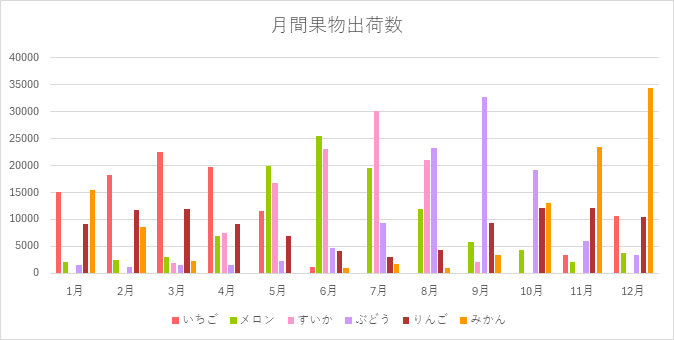
グラフの色を変更します。
グラフ色の配列を作成し、グラフの色を変更します。
注意点としては、線グラフは Line.ForeColor 、棒グラフは Fill.ForeColor となります。
【サンプルプログラム】
グラフの作成を基に作成しています。
Sub Graph_Create()
    Dim this_wb As Workbook
    Dim in_wb As Workbook
    Dim in_ws As Worksheet
    Dim out_wb As Workbook
    Dim out_ws As Worksheet
    Dim out_data_ws As Worksheet

    Dim in_filename As String
    Dim in_sheetname As String
    Dim out_filename As String
    Dim graph_title As String

    Dim graph_range As String
    Dim g_chart As Chart
    Dim x_pos As Long
    Dim y_pos As Long
    Dim img_filename As String
    Dim idx1 As Long

    Dim graph_color(12) As Long
    Dim graph_count As Integer


    ' グラフの色
    graph_color(1) = RGB(255, 100, 100)
    graph_color(2) = RGB(153, 204, 0)
    graph_color(3) = RGB(255, 153, 204)
    graph_color(4) = RGB(204, 153, 255)
    graph_color(5) = RGB(180, 51, 51)
    graph_color(6) = RGB(255, 153, 0)
    graph_color(7) = RGB(255, 153, 0)
    graph_color(8) = RGB(0, 128, 128)
    graph_color(9) = RGB(255, 204, 153)
    graph_color(10) = RGB(51, 204, 204)
    graph_color(11) = RGB(153, 204, 0)
    graph_color(12) = RGB(51, 102, 255)


    ' VBA マクロを実行しているワークブックを取得
    Set this_wb = ThisWorkbook

    ' Sheet1 に設定情報を定義してあるので読み出し
    With this_wb.Sheets(1)
        in_filename = .Range("B1")
        in_sheetname = .Range("B2")
        out_filename = .Range("B3")
        graph_title = .Range("B4")
    End With


    ' 出力先のワークブックを作成
    Set out_wb = Workbooks.Add
    ' グラフを出力する Sheetを取得し、名前の変更
    Set out_ws = out_wb.Sheets(1)
    out_ws.Name = "グラフ"


    ' 入力元のワークブックを開く
    If IsFileExists(in_filename) = False Then   ' ファイルの有無を確認
        MsgBox in_filename & "は存在しません", vbExclamation
        Exit Sub
    End If

    ' ワークブックを開く
    Set in_wb = Workbooks.Open(in_filename)

    ' Sheet を出力先のワークブックにコピーする
    in_wb.Sheets(in_sheetname).Copy Before:=out_ws

    ' ブックを閉じる(保存しない)
    in_wb.Close SaveChanges:=False

    ' データのSheetを保持しておく
    Set out_data_ws = out_wb.Sheets(in_sheetname)

    ' データ部の範囲
    graph_range = in_sheetname & "!" & "A1:" & _
                    GetLastColumnStr(out_data_ws) & GetLastRowStr(out_data_ws)

    ' グラフを表示するシートをアクティブにします
    out_ws.Activate


    ' ----------------------------------------------
    ' 折れ線グラフの作成

    ' チャートの追加
    Set g_chart = out_ws.Shapes.AddChart2(227, xlLine).Chart

    ' データの設定
    g_chart.SetSourceData Source:=Range(graph_range)
    ' タイトルの変更
    g_chart.ChartTitle.Text = graph_title
    ' 凡例の表示
    g_chart.SetElement (msoElementLegendBottom)


    ' グラフの色の最大数と、グラフの要素数を比較して最大数を超えないようにする
    If UBound(graph_color) <= g_chart.FullSeriesCollection.Count Then
        graph_count = UBound(graph_color)
    Else
        graph_count = g_chart.FullSeriesCollection.Count
    End If

        ' グラフの色を設定
    For idx1 = 1 To graph_count
        g_chart.FullSeriesCollection(idx1).Format.Line.ForeColor.RGB = graph_color(idx1)
    Next idx1


    ' グラフ表示位置 (B2から開始)
    x_pos = 2
    y_pos = 2

    With g_chart.ChartArea
        ' グラフの左端を変更
        .Left = out_ws.Range(Cells(y_pos, x_pos).Address).Areas.Item(1).Left
        ' グラフの上端を変更
        .Top = out_ws.Range(Cells(y_pos, x_pos).Address).Areas.Item(1).Top
        ' グラフの幅を変更
        .Width = 500
        ' グラフの高さを変更
        .Height = 250
    End With


    ' ----------------------------------------------
    ' 棒グラフの作成

    ' チャートの追加
    Set g_chart = out_ws.Shapes.AddChart2(201, xlColumnClustered).Chart
    ' データの設定
    g_chart.SetSourceData Source:=Range(graph_range)
    ' タイトルの変更
    g_chart.ChartTitle.Text = graph_title
    ' 凡例の表示
    g_chart.SetElement (msoElementLegendBottom)


    ' グラフの色の最大数と、グラフの要素数を比較して最大数を超えないようにする
    If UBound(graph_color) <= g_chart.FullSeriesCollection.Count Then
        graph_count = UBound(graph_color)
    Else
        graph_count = g_chart.FullSeriesCollection.Count
    End If

        ' グラフの色を設定
    For idx1 = 1 To graph_count
        g_chart.FullSeriesCollection(idx1).Format.Fill.ForeColor.RGB = graph_color(idx1)
    Next idx1


    ' グラフ表示位置
    y_pos = y_pos + 15

    With g_chart.ChartArea
        ' グラフの左端を変更
        .Left = out_ws.Range(Cells(y_pos, x_pos).Address).Areas.Item(1).Left
        ' グラフの上端を変更
        .Top = out_ws.Range(Cells(y_pos, x_pos).Address).Areas.Item(1).Top
        ' グラフの幅を変更
        .Width = 500
        ' グラフの高さを変更
        .Height = 250
    End With

End Sub
【成果物】


好きな色は、Excel等の「色の設定」でRGBを取得して設定してください。

コメント